Before rushing to prove that you’re not a robot, be wary of deceptive human verification pages as an increasingly popular vector for delivering malware
Bots have got a lot to answer for. They now make up over half of all internet traffic, and while some, such as Google’s web crawlers and fetchers, have legitimate purposes, nearly two-fifths are considered malicious. Their power can be harnessed for everything from posting inflammatory social media posts to launching distributed denial-of-service attacks and hijacking online accounts using, for example, previously breached passwords.
So when we’re presented with what’s known as a CAPTCHA challenge, which websites commonly use to deter bots, many of us follow the instructions and click through. All the better to keep the bots out, right? Well, not always. Sometimes the page itself is a fake and could land you in deep trouble.
This could, for example, be the case with ClickFix, a social engineering technique that has taken the threat landscape by storm recently. Using fake CAPTCHA images, ClickFix spreads all manner of threats, including infostealers, ransomware, remote access trojans, cryptominers, and even malware from nation-state-aligned threat actors.
Why the CAPTCHA threat works
CAPTCHA threats work for several reasons:
- It exploits our familiarity with the process and our trust in CAPTCHA as a way to keep the digital world safe and secure.
- It also exploits the fact that many of us are impatient when we’re browsing: we just want to access the content we came for and CAPTCHA is in our way, hence we’re more likely to do what it says.
- It takes advantage of the fact we’re used to clicking through multiple steps to verify ourselves online; for example when paying online.
- It hides the malicious activity from us, and our security software, and uses legitimate Windows tools to stay under the radar.
What do CAPTCHA threats look like?
There are various ways you may be exposed to a malicious CAPTCHA. It may be that you are tricked into clicking on a malicious link in a phishing email, text or social media message. Thanks to AI, this threat is growing. Generative AI is helping threat actors to scale social engineering attacks while improving the quality of the language to near-perfect, in multiple languages at once.
Alternatively, you may visit a random, legitimate site that hackers have injected malicious ads or other content into. These are particularly dangerous as no user interaction is required for the download. And you may not realize that anything untoward has happened until it’s too late.
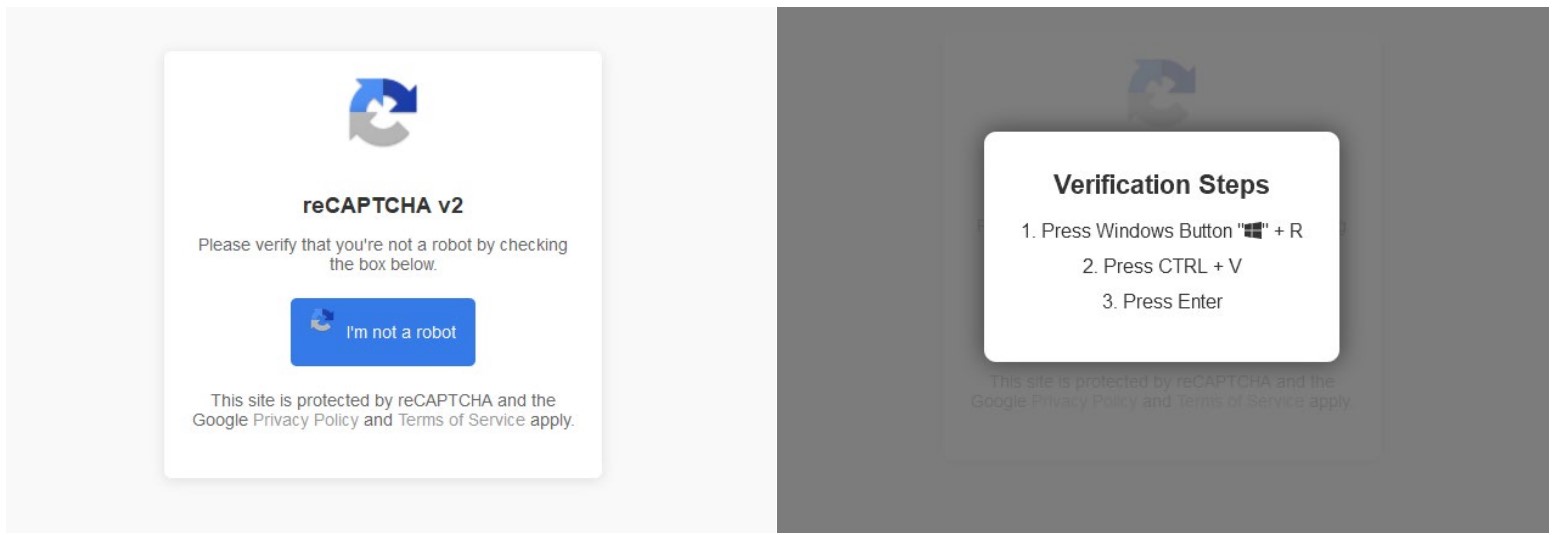
When the CAPTCHA box pops up it will look legitimate enough. But what it asks you to do should set alarm bells ringing. Instead of the usual CAPTCHA task, like identifying similar images or typing text that has been obfuscated in some way, it will ask you to perform specific commands like:
- Clicking through to verify you are a human
- Pressing Windows key + R to open “Run”
- Pressing CTRL + V to paste a command secretly copied to the clipboard by the malware
- Pressing ENTER to execute the above command
This command often triggers legitimate Windows tools like PowerShell or mshta.exe to download additional malicious payloads from an external server. The end goal is usually to install infostealer malware on your device.
Infostealers are designed to scour the computer or mobile phone for logins, photos, contacts, and other sensitive data to sell on the dark web and/or use to commit identity fraud. They target browsers, email clients, crypto wallets, apps and the operating systems itself to do so – taking screenshots, keylogging and harvesting data in other ways.
According to one study, there were at least 23 million infostealer victims in 2024, most of which were Windows systems. They managed to steal over two billion victim credentials. One of the most popular strains of infostealing malware, Lumma Stealer, compromised as many as 10 million devices before an international effort, which involved also ESET, disrupted this prolific malware-as-a-service (MaaS) threat.
A CAPTCHA threat could also install a remote access trojan (RAT), another type of malware but this time designed to provide remote access to your machine. According to one study, AsyncRAT was seen in 4% of incidents during 2024. This RAT has been operational since 2019 and carries out activities including like data theft and keylogging.
Staying safe from CAPTCHA threats
To stay safe from infostealers, RATs and other nasties, consider the following:
- Stay alert to unusual CAPTCHA requests like the ones listed above.
- Be cautious of any CAPTCHA challenge that seems to pop up out of nowhere.
- Keep your OS and browser software up to date, to minimize the risk of malware exploiting vulnerabilities in older versions.
- Install security software from a reputable vendor and keep it updated. This will go a long way toward blocking any malware or suspicious activity.
- Don’t download pirated software, as this could contain malware of the sort that delivers fake CAPTCHAs.
- Consider using an ad blocker, which would stop you from being exposed to any content delivered via a malicious online ad.
What happens if you fall for a fake CAPTCHA
If the worst happens and you unwittingly execute the hidden commands described above:
- Run a malware scan to find and hopefully purge the machine of any malware that may have been covertly downloaded.
- Disconnect from the internet and backup any important photos and/or files.
- Perform a factory reset on your computer or device.
- Change all your passwords, using strong, unique credentials stored in a password manager.
- Switch on multi factor authentication (MFA) for all accounts, so that even if a hacker has stolen your passwords they can’t access your accounts.
Falling for a CAPTCHA threat isn’t the end of the world. But it pays to act fast if you find yourself in a worst-case scenario. Be safe out there.