


Cybersecurity researchers have disclosed details of an ongoing campaign dubbed KongTuke that used a malicious Google Chrome extension masquerading as an ad blocker to deliberately crash the web browser and trick victims into running arbitrary commands using ClickFix-like lures to deliver a previously undocumented remote access trojan (RAT) dubbed ModeloRAT.
This new escalation of ClickFix, observed earlier this month, has been codenamed CrashFix by Huntress.
KongTuke, also tracked as 404 TDS, Chaya_002, LandUpdate808, and TAG-124, is the name given to a traffic distribution system (TDS) known for profiling victim hosts before redirecting them to a payload delivery site that infects their systems. Access to these compromised hosts is then handed off to other threat actors, including ransomware groups, for follow-on malware delivery.
Some of the cybercriminal groups that have leveraged TAG-124 infrastructure include Rhysida ransomware, Interlock ransomware, and TA866 (aka Asylum Ambuscade), with the threat actor behind the malicious TDS also associated with SocGholish and D3F@ck Loader, according to a Recorded Future report from April 2025.
In the attack chain documented by the cybersecurity company, the victim is said to have searched for an ad blocker when they were served a malicious advertisement that redirected them to an extension hosted on the Official Chrome Web Store.
The browser extension in question, “NexShield – Advanced Web Guardian” (ID: cpcdkmjddocikjdkbbeiaafnpdbdafmi), masquerades as the “ultimate privacy shield” and claims to protect users against ads, trackers, malware, and intrusive content on web pages. It was downloaded at least 5,000 times. It’s currently no longer available for download.
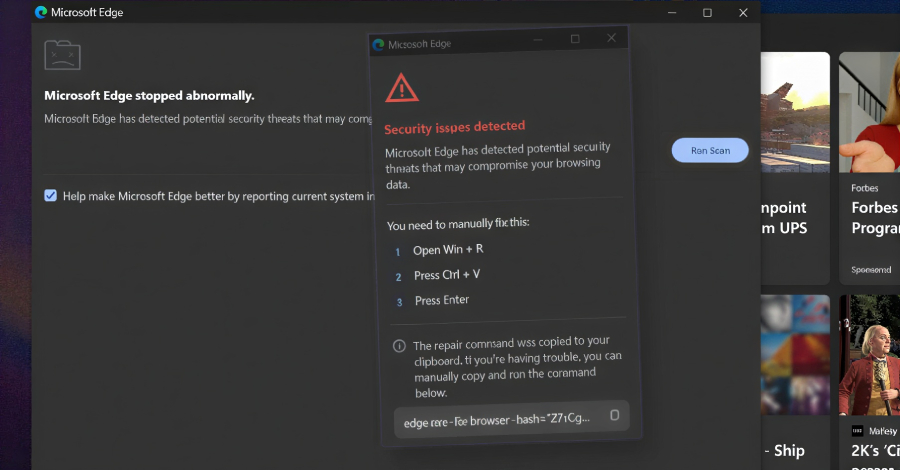
The extension, per Huntress, is a near-identical clone of uBlock Origin Lite version 2025.1116.1841, a legitimate ad blocker add-on available for all major web browsers. It’s engineered to display a fake security warning, claiming the browser had “stopped abnormally” and prompting users to run a “scan” to remediate a potential security threat detected by Microsoft Edge.
Should the user opt to run the scan, the victim is presented with a bogus security alert that instructs them to open the Windows Run dialog and paste the displayed command already copied to the clipboard, and execute it. This, in turn, causes the browser to completely freeze, crashing it by launching a denial-of-service (DoS) attack that creates new runtime port connections through an infinite loop that triggers one billion iterations of the same step repeatedly.
This resource exhaustion technique results in excessive memory consumption, causing the web browser to become slow, unresponsive, and eventually crash.
Once installed, the extension is also designed to transmit a unique ID to an attacker-controlled server (“nexsnield[.]com“), giving the operators the ability to track victims. In addition, it adopts a delayed execution mechanism that ensures the malicious behavior is only triggered 60 minutes after it’s installed. After that, the payload is executed every 10 minutes.
“The pop-up only appears on browser startup after the browser becomes unresponsive,” researchers Anna Pham, Tanner Filip, and Dani Lopez said. “Before the DoS executes, a timestamp is stored in local storage. When the user force-quits and restarts their browser, the startup handler checks for this timestamp, and if it exists, the CrashFix popup appears, and the timestamp is removed.”
“The DoS only executes if the UUID exists (meaning the user is being tracked), the C2 server responds successfully to a fetch request, and the pop-up window has been opened at least once and subsequently closed. This last condition may be intentional to ensure user interaction with the extension before triggering the payload.”
The end result is that it creates a loop of its own, activating the fake warning every time the victim force-quits and restarts the browser after it becomes unresponsive due to the DoS attack. In the event the extension is not removed, the attack is triggered again after 10 minutes.
The pop-up also incorporates various anti-analysis techniques that disable right-click context menus and prevent attempts to use keyboard shortcuts to launch developer tools. The CrashFix command employs the legitimate Windows utility, finger.exe, to retrieve and execute the next-stage payload from the attacker’s server (“199.217.98[.]108”). KongTuke’s use of the Finger command was documented by security researcher Brad Duncan in December 2025.
The payload received from the server is a PowerShell command that’s configured to retrieve a secondary PowerShell script, which, in turn, takes a page out of SocGholish’s playbook, using multiple layers of Base64 encoding and XOR operations to conceal the next-stage malware.
The decrypted blob scans running processes for over 50 analysis tools and virtual machine indicators, and immediately ceases execution, if found. It also checks if the machine is domain-joined or standalone, and sends an HTTP POST request to the same server containing two pieces of information –
- A list of installed antivirus products
- A flag with the value “ABCD111” for standalone “WORKGROUP” machines or “BCDA222” for domain-joined hosts
If the compromised system is marked as domain-joined in the HTTP request, the KongTuke attack chain culminates with the deployment of ModeloRAT, a fully-featured Python-based Windows RAT that uses RC4 encryption for command-and-control (C2) communications (“170.168.103[.]208” or “158.247.252[.]178”), sets up persistence using Registry, and facilitates the execution of binaries, DLLs, Python scripts, and PowerShell commands.
ModeloRAT is equipped to update or terminate itself upon receiving a self-update (“VERSION_UPDATE”) or exit (“TERMINATION_SIGNAL”) command. It also implements a varied beaconing logic to fly under the radar.
“Under normal operation, it uses a standard interval of 300 seconds (5 minutes),” Huntress said. “When the server sends an activation configuration command, the implant enters active mode with rapid polling at a configurable interval, defaulting to 150 milliseconds.”
“After six or more consecutive communication failures, the RAT backs off to an extended interval of 900 seconds (15 minutes) to avoid detection. When recovering from a single communication failure, it uses a reconnection interval of 150 seconds before resuming normal operations.”
While the targeting of domain-joined machines with ModeloRAT suggests that KongTuke is going after corporate environments to facilitate deeper access, users on standalone workstations are subjected to a separate multi-stage infection sequence that ends with the C2 server responding with the message “TEST PAYLOAD!!!!,” indicating it could still be in the testing phase.
“KongTuke’s CrashFix campaign demonstrates how threat actors continue to evolve their social engineering tactics,” the cybersecurity company concluded. “By impersonating a trusted open-source project (uBlock Origin Lite), crashing the user’s browser on purpose, and then offering a fake fix, they have built a self-sustaining infection loop that preys on user frustration.”

