Close Menu
  • Home
  • News
  • Cyber Security
  • Internet of Things
  • Tips and Advice

Subscribe to Updates

Get the latest creative news from FooBar about art, design and business.

What's Hot

New CISA Guide Helps Agencies Adopt SASE For Zero Trust

June 25, 2026

Microsoft Confirms RoguePlanet Defender Zero-Day, Says Patch is in Development

June 25, 2026

Trust in Automated AI Vulnerability Scanning Collapses to 9%

June 25, 2026
Facebook X (Twitter) Instagram
Thursday, June 25
Facebook X (Twitter) Instagram Pinterest Vimeo
Cyberwire Daily
  • Home
  • News
  • Cyber Security
  • Internet of Things
  • Tips and Advice
Cyberwire Daily
Home»News»Mozilla Adds One-Click Option to Disable Generative AI Features in Firefox
News

Mozilla Adds One-Click Option to Disable Generative AI Features in Firefox

Team-CWDBy Team-CWDFebruary 10, 2026No Comments2 Mins Read
Share Facebook Twitter Pinterest LinkedIn Tumblr Reddit Telegram Email
Share
Facebook Twitter LinkedIn Pinterest Email


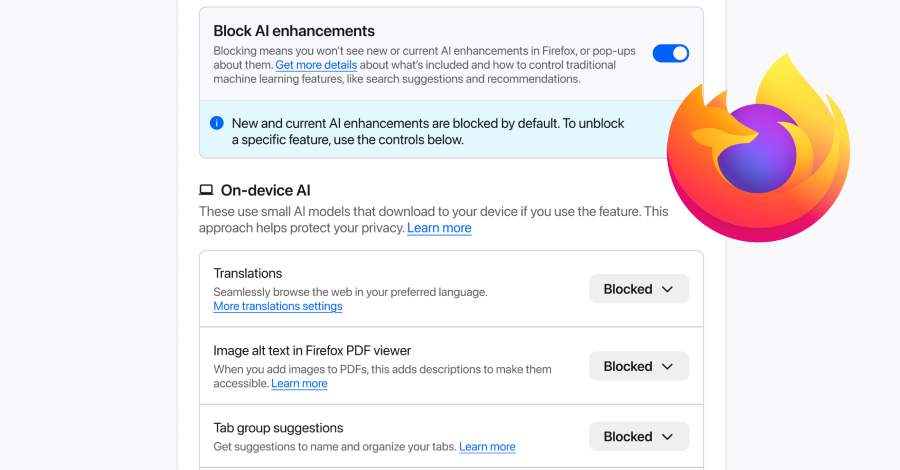
Mozilla on Monday announced a new controls section in its Firefox desktop browser settings that allows users to completely turn off generative artificial intelligence (GenAI) features.

“It provides a single place to block current and future generative AI features in Firefox,” Ajit Varma, head of Firefox, said. “You can also review and manage individual AI features if you choose to use them. This lets you use Firefox without AI while we continue to build AI features for those who want them.”

Mozilla first announced its plans to integrate AI into Firefox in November 2025, stating it’s fully opt-in and that it’s incorporating the technology while placing users in the driver’s seat.

The new feature is expected to be rolled out with Firefox 148, which is scheduled to be released on February 24, 2026. At the outset, AI controls will allow users to manage the following settings individually –

  • Translations
  • Alt text in PDFs (adding accessibility descriptions to images in PDF pages)
  • AI-enhanced tab grouping (suggestions for related tabs and group names)
  • Link previews (show key points before a link is opened)
  • AI chatbot in the sidebar (Using well-known chatbots like Anthropic Claude, OpenAI ChatGPT, Microsoft Copilot, Google Gemini, and Le Chat Mistral while navigating the web)

Mozilla said user choice is crucial as more AI features are baked into web browsers, adding that it believes in giving people control regardless of how they feel about the technology.

“If you don’t want to use AI features from Firefox at all, you can turn on the Block AI enhancements toggle,” Varma said. “When it’s toggled on, you won’t see pop-ups or reminders to use existing or upcoming AI features.”

Last month, Mozilla’s new CEO, Anthony Enzor-DeMeo, said the company’s focus will be on becoming a trusted software company that gives users agency in how its products work. “Privacy, data use, and AI must be clear and understandable,” Enzor-DeMeo said. “Controls must be simple. AI should always be a choice – something people can easily turn off.”


Source

Share. Facebook Twitter Pinterest LinkedIn Tumblr Email
Previous ArticleEuropean Governments Breached in Zero-Day Attacks Targeting Ivanti
Next Article NCSC Issues Warning Over “Severe” Cyber-Attacks Targeting CNI
Team-CWD
  • Website

Related Posts

News

New CISA Guide Helps Agencies Adopt SASE For Zero Trust

June 25, 2026
News

Microsoft Confirms RoguePlanet Defender Zero-Day, Says Patch is in Development

June 25, 2026
News

Trust in Automated AI Vulnerability Scanning Collapses to 9%

June 25, 2026
Add A Comment
Leave A Reply Cancel Reply

Latest News

North Korean Hackers Turn JSON Services into Covert Malware Delivery Channels

November 24, 202522 Views

macOS Stealer Campaign Uses “Cracked” App Lures to Bypass Apple Securi

September 7, 202517 Views

North Korean Hackers Target Crypto Firms with ClickFix and Zoom Lures

April 29, 202610 Views

Why SOC Burnout Can Be Avoided: Practical Steps

November 14, 20259 Views

Cyber M&A Roundup: Cyber Giants Strengthen AI Security Offerings

December 1, 20258 Views
Stay In Touch
  • Facebook
  • YouTube
  • TikTok
  • WhatsApp
  • Twitter
  • Instagram
Most Popular

North Korean Hackers Turn JSON Services into Covert Malware Delivery Channels

November 24, 202522 Views

macOS Stealer Campaign Uses “Cracked” App Lures to Bypass Apple Securi

September 7, 202517 Views

North Korean Hackers Target Crypto Firms with ClickFix and Zoom Lures

April 29, 202610 Views
Our Picks

Why geopolitical turmoil is a gift for scammers, and how to stay safe

May 15, 2026

What’s at stake if your employees post too much online

December 1, 2025

Why you should never pay to get paid

September 15, 2025

Subscribe to Updates

Get the latest news from cyberwiredaily.com

Facebook X (Twitter) Instagram Pinterest
  • Home
  • Contact
  • Privacy Policy
  • Terms of Use
  • California Consumer Privacy Act (CCPA)
© 2026 All rights reserved.

Type above and press Enter to search. Press Esc to cancel.