Your inbox is an identity system all of its own: whoever owns it may own a lot more
Email is not just a means of communication, or yet another online account. In both our personal and work lives, it holds the keys to the kingdom: possibly even a mechanism to reset other account passwords and verify your identity. Email accounts are also the place where password-reset links arrive, account alerts are stored, bookings are confirmed, invoices are filed and identity checks begin.
The inbox may, therefore, contain years’ worth of detailed information about you, including what you own, which services you use, where you go, who you trust and how other accounts can be reached.
That’s why it’s also a prized target for cybercriminals.. If you want to protect your personal or business accounts and data, security must start with your inbox.
Why attackers love inbox access
Attackers have your inbox in their sights because it can give them leverage over the rest of your digital life. With access to your email account, they can reset your passwords across multiple other accounts – perhaps intercepting one-time passcodes sent by your bank, social media, cloud storage or other online provider.
They may also try to stay hidden, setting up automatic forwarding rules so they can keep receiving your messages even after you think the immediate problem has been fixed. In other words, even if you perform a password reset, they’ll get sent the reset codes. Others may abuse access tokens, connected apps or active sessions to retain a foothold.
Hackers could access your photos for potential blackmail, and eavesdrop on your communications. That could lay the groundwork for a convincing phishing email designed to impersonate a trusted organization you interact with. It might ask for money, fee payments, or more personal information with which to carry out identity fraud. The more information (e.g., account details) they have on you, the more convincing the phishing attack will be.
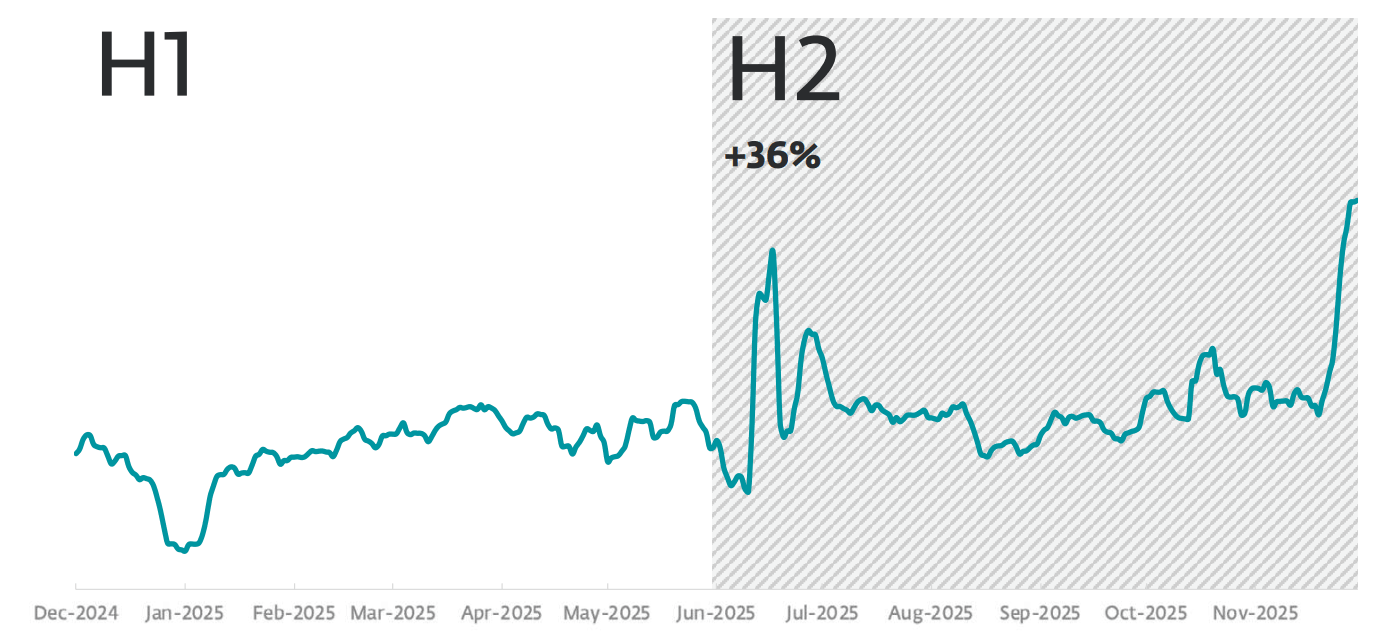
Broadly speaking, phishing as an acute threat clearly isn’t going anywhere. Quite the opposite: ESET telemetry showed a 36-percent increase in malicious emails in the second half of 2025 compared with the previous six months.
The repercussions on your work life could be even worse. With access to your corporate email account, hackers could open cloud apps, access shared drives, peer into CRM, finance and HR systems, eavesdrop on your messages with colleagues and customers, and access customer data.
A phishing attack on your corporate email account is often the first stage in a bigger data breach, extortion/ransomware or espionage attack. According to recent UK government statistics, phishing (38%) was the most common form of cyber attack in the past year, followed by “people impersonating organizations in emails” (12%).
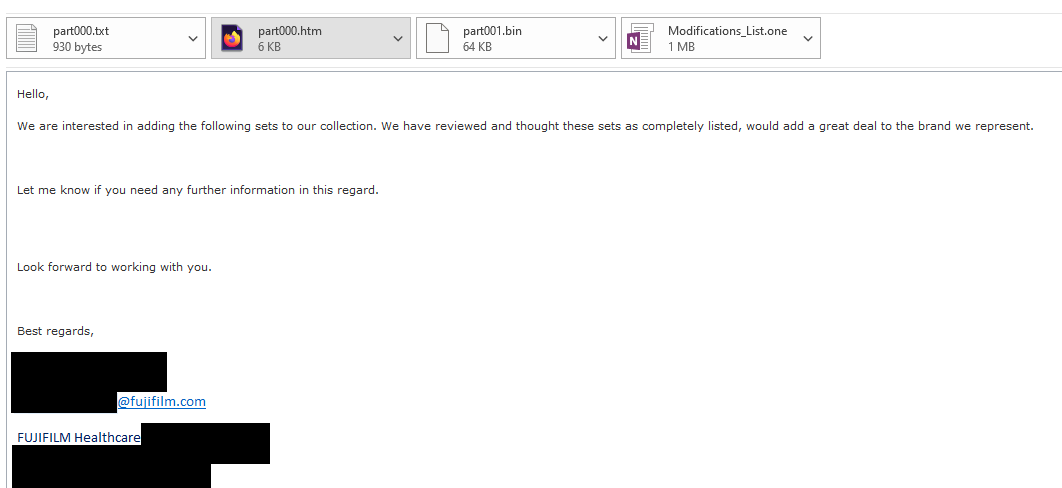
Figure 3. Phishing email delivering Win/PSW.Delf trojan, pretending to be from Fujifilm (source: ESET Threat Report H2 2024)
It’s getting harder to protect your inbox
Email remains attractive to attackers because it sits at the intersection of technology, identity and human trust. Phishing targets what’s arguably the weakest link in the security chain: humans. We all use email every day under time pressure – to receive invoices, delivery updates, HR notices, customer requests, password resets, meeting invites and security alerts. Many of these messages ask us to click, approve, download, reply or pay. Attackers exploit that routine as even careful users can make mistakes when a message appears to come from a familiar sender, arrives at a busy moment or carries a sense of urgency. Using impersonation and social engineering techniques, hackers have a higher chance of success.
The human element was present in 62% of breaches last year, with social engineering the third most common breach pattern, representing 16% of all breaches, according to Verizon. And the bad guys are always looking for new ways to trick you. The report notes that the median rate of “successful” click rates in mobile phishing simulations is 40% higher than for email.
They’re also using more sophisticated tools to improve the success rates of email phishing campaigns. Generative AI (GenAI) can help threat actors write and scale phishing messages with faultless grammar and spelling.
A case in point: BEC
Some of the most damaging and costly cyber attacks ever recorded began with an inbox compromise. They include:
Facebook and Google: The tech duo were tricked out of funds estimated at over $120 million after a hacker emailed them fake invoices impersonating a legitimate supplier and containing forged documents.
Children’s Healthcare of Atlanta: After a construction firm publicly announced it had been named the general contractor for a new building project at the hospital, quick-thinking fraudsters sent a request for payment, impersonating the builder. They reportedly spoofed the letterhead and email address of the company, in an email purporting to come from its CFO.
Crelan Bank: The Cretan bank lost over $75 million after an employee was tricked into wiring the funds to a bank account controlled by fraudsters. In this instance the scammers reportedly hijacked the email account of a high-level executive, before impersonating the firm’s CEO.
Protecting your inbox
If you’re a home user, be sure to use a strong, unique password or passphrase for every account and store it in a reputable password manager. Alternatively, use a passwordless method such as a passkey. At any rate, do turn on multi-factor authentication – these days, it’s almost always available. Keep your recovery options up to date, and make sure an attacker can’t use an old phone number or forgotten backup email address to regain access.
It’s also worth checking your email settings from time to time. Look for unfamiliar forwarding rules, strange filters, unknown connected apps or devices you don’t recognize. If your inbox has been compromised, change the password, revoke suspicious sessions, review recovery details and check whether messages are being forwarded without your knowledge.
Other security best practices include:
Be phishing aware. Treat any unsolicited email with caution. Hover over the sender name to check for a mismatch. Check the spelling of sender domains for any typos. Don’t click on any links or open attachments in unsolicited emails. Check separately with the sender if necessary.
Don’t approve any device code or MFA alerts (e.g., on your mobile) that you didn’t trigger, as it could be a hackers trying their luck.
Ensure your recovery options are clear and up to date.
If you’re an employee, treat any urgent wire transfer requests with caution, even if it looks like it’s from your CEO or IT department. Verify with a colleague/through a separate channel.
Treat employee security awareness training seriously, noting the latest phishing tactics and techniques that fraudsters are using.
Use a comprehensive security solution from a trusted provider to keep you safe from malware and suspicious messages.
Virtually everyone uses email. That makes it an evergreen target for hackers. But not everyone’s inbox has to be exposed. Take suitable precautions to maximize your chances of staying safe online.